Ornate Iron Railing and Fence Silhouette: A Guide to Precision and Elegance in Design
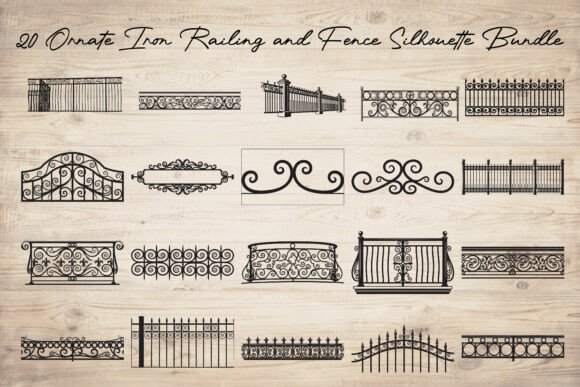
Adding architectural depth to digital or physical projects often requires more than just basic shapes. The Ornate Iron Railing and Fence Silhouette bundle offers a sophisticated solution for creators who need intricate, high-quality decorative elements without the steep learning curve of designing complex metalwork from scratch. Whether you are crafting laser-cut home décor, designing vintage-style invitations, or prototyping garden layouts, these vector assets provide the classic elegance of wrought iron with modern usability.
However, many designers and hobbyists overlook critical details when integrating such detailed silhouettes into their workflows. Misunderstanding file formats, ignoring scale implications, or neglecting material constraints can lead to wasted resources and frustrated clients. This guide explores common pitfalls and provides practical advice to ensure you get the most out of your ornamental iron designs.
Understanding the Versatility of Wrought Iron Silhouettes
At its core, this collection features beautifully crafted decorative wrought iron railings, fences, gates, and ornamental scrollwork borders. Inspired by classic metalwork, these designs capture the essence of traditional craftsmanship through clean black silhouette styles. The appeal lies in their adaptability. Because each design is created as high-quality vector artwork, you can resize them infinitely without losing detail. This makes them ideal for everything from small scrapbooking embellishments to large-scale signage and CNC-cut metal panels.
The bundle includes twenty distinct designs, each provided in SVG, PNG, JPG, EPS, and PDF formats. This variety ensures compatibility with nearly every creative software, from Adobe Illustrator and CorelDRAW to user-friendly platforms like Cricut Design Space and Silhouette Studio. Yet, having access to these files is only half the battle; knowing how to use them correctly is what separates amateur results from professional finishes.
Common Mistakes and How to Avoid Them
One of the most frequent errors creators make is assuming all vector files are created equal. While SVGs are widely supported, not all SVGs are optimized for cutting machines. Some may contain unnecessary nodes or open paths that cause cutting plotters to stutter or fail. Before sending a design to your laser cutter or vinyl plotter, always inspect the path structure. Simplify complex curves where possible and ensure all shapes are closed if you intend to fill them with color or cut them out entirely.
Another overlooked detail is the relationship between design complexity and material thickness. Ornate scrollwork often features delicate curves and thin connections. If you are using these silhouettes for physical projects like wood engraving or metal cutting, failing to account for material grain or kerf width can result in fragile pieces that break during handling. For instance, a intricate fence border might look stunning on screen, but if the thinnest part of the scroll is narrower than your material’s structural integrity allows, the final product will be disappointing. Always test a small section first or adjust the line weight in your design software to reinforce vulnerable areas.
Additionally, many users neglect the importance of resolution when using raster formats like PNG or JPG. While vectors are scalable, raster images are not. If you plan to use the PNG files for large-format printing, such as a banner or wall mural, ensure you are using the highest resolution available. Blurry edges on an ornate railing can ruin the illusion of crisp metalwork. For large-scale applications, stick to the EPS or SVG files to maintain sharpness at any size.
Choosing the Right Format for Your Project
With five file types included in the bundle, selecting the right one can feel overwhelming. Here is a practical breakdown to help you decide:
- SVG: Best for web design, digital cutting machines (Cricut, Silhouette), and scalable graphics. It preserves editability and small file sizes.
- EPS: Ideal for professional print shops and advanced vector editing in Adobe Illustrator. It supports complex color profiles and layers.
- PDF: Perfect for sharing previews with clients or printing directly from standard office printers. It maintains vector quality while being universally viewable.
- PNG: Use this for digital mockups, social media graphics, or projects requiring transparency. Ensure you choose the correct resolution for your output size.
- JPG: Suitable for quick references or non-transparent backgrounds. Avoid using JPGs for cutting or high-quality print due to compression artifacts.
By matching the file type to your specific toolset, you streamline your workflow and avoid unnecessary conversion steps that can degrade quality.
Enhancing Creativity with Ornamental Elements
Beyond technical considerations, think creatively about how these silhouettes can elevate your projects. Instead of using a fence panel solely as a border, consider using it as a background texture for wedding invitations or as a layered element in digital art. The contrast between the intricate black ironwork and soft pastel colors can create a striking visual impact. For home décor enthusiasts, these designs can be translated into metal wall art, wooden room dividers, or even stenciled patterns on furniture.
When combining multiple elements from the bundle, pay attention to visual balance. Mixing overly complex scrolls with simple geometric lines can create tension that draws the eye. Try pairing a detailed gate silhouette with a minimalist frame to let the ornamentation shine without overwhelming the viewer. This approach works well for signage design, where readability is key but aesthetic appeal cannot be sacrificed.
Final Checks Before Implementation
Before finalizing any project involving the Ornate Iron Railing and Fence Silhouette bundle, take a moment to review your setup. Check your machine’s settings for speed and power, especially if working with new materials. Verify that your design software has correctly interpreted the vector paths, and preview the cut or print job virtually if possible. For digital projects, ensure color contrasts meet accessibility standards if the ironwork is used as a functional interface element.
By approaching these elegant designs with a mix of technical precision and creative foresight, you can avoid common pitfalls and produce work that truly stands out. Whether you are a seasoned professional or a curious hobbyist, these ornamental iron elements offer a timeless charm that, when used correctly, adds significant value to your creative portfolio.